Post Top Ad

Showing posts with label laravel. Show all posts

Tuesday, September 3, 2019

September 03, 2019

Laravel 6 Is Now Released

Here are some of the new features included in Laravel 6:

Laravel 6 Is Now Released

Laravel 6.0 Is the New LTS

The release of Laravel 6.0 marks the new LTS version of Laravel, with bugfixes until September 3rd, 2021 and security fixes until September 3rd, 2022. Laravel 5.5 was the previous LTS (with security fixes until August 30th, 2020). Here’s the updated table with versions and dates of the latest versions of Laravel:
VersionReleaseBug Fixes UntilSecurity Fixes Until
V1June 2011––
V2September 2011––
v3February 2012––
v4May 2013––
5.0Feb 4th, 2015Aug 4th, 2015Feb 4th, 2016
5.1 (LTS)Jun 9th, 2015Jun 9th, 2017Jun 9th, 2018
5.2Dec 21st, 2015Jun 21st, 2016Dec 21st, 2016
5.3Aug 23rd, 2016Feb 23rd, 2017Aug 23rd, 2017
5.4Jan 24th, 2017Jul 24th, 2017Jan 24th, 2018
5.5 (LTS)Aug 30th, 2017Aug 30th, 2019Aug 30th, 2020
5.6Feb 7th, 2018Aug 7th, 2018Feb 7th, 2019
5.7Sep 4, 2018Feb 4th, 2019Sep 4th, 2019
5.8Feb 26th, 2019Aug 26th, 2019Feb 26th, 2020
6.0 (LTS)Sept 3rd, 2019Sept 3rd, 2021Sept 3rd, 2022

Semantic Versioning

The Laravel release notes clarify semantic versioning going forward in Laravel 6.0 and beyond:
The Laravel framework (laravel/framework) package now follows the semantic versioning standard. This makes the framework consistent with the other first-party Laravel packages which already followed this versioning standard. The Laravel release cycle will remain unchanged.

Improved Authorization Responses

Previously it was difficult to provide custom error messages around authorization to end users. Laravel 6 introduces a Gate::inspect method which provides the authorization policy’s response:
$response = Gate::inspect('view', $flight);

if ($response->allowed()) {
    // User is authorized to view the flight...
}

if ($response->denied()) {
    echo $response->message();
}

Job Middleware

Job Middleware is a feature contributed by Taylor Otwell, which allows jobs to run through middleware:
// Add a middleware method to a job class
public function middleware()
{
     return [new SomeMiddleware];
}

// Specify middleware when dispatching a job
SomeJob::dispatch()->through([new SomeMiddleware]);
The middleware will help you avoid custom logic in the body of your job’s handle() method. Learn more in our post: Job Middleware is Coming to Laravel 6.

Lazy Collections

Lazy collections are a game-changer for working with extensive collections of data, including Eloquent model collections. A new Illuminate\Support\LazyCollection class leverages PHP’s generators to keep memory low while working with large datasets. Check out Lazy Collections documentation for more details on this impressive new feature!

Eloquent Subquery Enhancements

Learn more about Jonathan Reinink’s contributions to subqueries in his post on Laravel News – Eloquent Subquery Enhancements in Laravel 6.0. Also, check out Jonathan’s excellent talk on using subqueries (among other techniques) in his Laracon talk Eloquent Performance Patterns.

Laravel UI

The frontend scaffolding provided with Laravel 5.x releases is now extracted into a separate laravel/ui Composer package. This allows first-party UI scaffolding to be iterated on separately from the primary framework.
If you want the Traditional Bootstrap/Vue/ scaffolding, you will run the following command:
composer require laravel/ui
php artisan ui vue --auth

Learn More

You should now be able to start a new Laravel 6 application with the laravel CLI tool:
laravel new my-app
Here’s a few resources related to Laravel 6 that you should check out:

Friday, June 21, 2019

Saturday, February 2, 2019

February 02, 2019

Laravel 5.8 Deprecates String and Array Helpers

         In the upcoming release of laravel 5.8, the array & string helper are deprecated. The next release of laravel 5.9 will be removed the array and string helper. It's based on the discussion of the PR 26898. 

The previous version of laravel

// Deprecated array_add($array, $key, $value);


The upcoming release of laravel 

// Use this directly Arr::add($array, $key, $value);


If you prefer to use the helper in your project.
Taylor suggests to pack into the packages laravel/helper


Monday, January 29, 2018

January 29, 2018

Laravel 5.6 will Support the Argon2i Password Hashing Algorithm


Image result for laravel 5.6  new features

In 2013, cryptographers and security practitioners around the world came together to create an open Password Hashing Competition (PHC) with the goal of selecting one or more password hash functions to be recognized as a recommended standard.
On July 20th, 2015 Argon2 that was designed by Alex Biryukov, Daniel Dinu, and Dmitry Khovratovich from the University of Luxembourg was selected as the final PHC winner. Argon2 comes in the following three versions:
  • Argon2d maximizes resistance to GPU cracking attacks.
  • Argon2i is optimized to resist side-channel attacks. It accesses the memory array in a password independent order.
  • Argon2id is a hybrid version. It follows the Argon2i approach for the first pass over memory and the Argon2d approach for subsequent passes.
x
With the release of PHP 7.2 in November of 2017, PHP now includes functions for both the 2d and i version. However, the 2d is not suitable for password hashing.
Laravel 5.6 that is due out next month will now feature Argon2i password hashing support thanks to Michael Lundbøl, and you can find out how it’s implemented through the following pull request.
The old style of bcrypt will continue to be supported and will remain the default, but if you are starting a new project then it might be worth considering using the Argon2i driver once Laravel 5.6 officially makes it release.

Sunday, January 14, 2018

January 14, 2018

Laravel Model Caching


Laravel Model Caching


You’ve probably cached some model data in the controller before, but I am going to show you a Laravel model caching technique that’s a little more granular using Active Record models. This is a technique I originally learned about on RailsCasts.
Using a unique cache key on the model, you can cache properties and associations on your models that are automatically updated (and the cache invalidated) when the model (or associated model) is updated. A side benefit is that accessing the cached data is more portable than caching data in the controller, because it’s on the model instead of within a single controller method.
Here’s the gist of the technique:
Let’s say you have an Article model that has many Comment models. Given the following Laravel blade template, you might retrieve the comment count like so on your /article/:id route:
<h3>$article->comments->count() {{ str_plural('Comment', $article->comments->count())</h3>
You could cache the comment count in the controller, but the controller can get pretty ugly when you have multiple one-off queries and data you need to cache. Using the controller, accessing the cached data isn’t very portable either.
We can build a template that will only hit the database when the article is updated, and any code that has access to the model can grab the cached value:
<h3>$article->cached_comments_count {{ str_plural('Comment', $article->cached_comments_count)</h3>
Using a model accessor, we will cache the comment count based on the last time the article was updated.
So how do we update the article’s updated_at column when a new comment is added or removed?
Enter the touch method.

Touching Models

Using the model’s touch() method, we can update an article’s updated_at column:
$ php artisan tinker

>>> $article = \App\Article::first();
=> App\Article {#746
     id: 1,
     title: "Hello World",
     body: "The Body",
     created_at: "2018-01-11 05:16:51",
     updated_at: "2018-01-11 05:51:07",
   }
>>> $article->updated_at->timestamp
=> 1515649867
>>> $article->touch();
=> true
>>> $article->updated_at->timestamp
=> 1515650910
We can use the updated timestamp to invalidate a cache, but how can we touch the article’s updated_at field when we add or remove a comment?
It just so happens that Eloquent models have a property called $touches. Here’s what our comment model might look like:
<?php

namespace App;

use App\Article;
use Illuminate\Database\Eloquent\Model;

class Comment extends Model
{
    protected $guarded = [];

    protected $touches = ['article'];

    public function article()
    {
        return $this->belongsTo(Article::class);
    }
}
The $touches property is an array containing the association that will get “touched” when a comment is created, saved, or removed.

The Cached Attribute

Let’s go back to the $article->cached_comments_count accessor. The implementation might look like this on the App\Article model:
public function getCachedCommentsCountAttribute()
{
    return Cache::remember($this->cacheKey() . ':comments_count', 15, function () {
        return $this->comments->count();
    });
}
We are caching the model for fifteen minutes using a unique cacheKey() method and simply returning the comment count inside the closure.
Note that we could also use the Cache::rememberForever() method and rely on our caching mechanism’s garbage collection to remove stale keys. I’ve set a timer so that the cache will be hit most of the time, with a fresh cache every fifteen minutes.
The cacheKey() method needs to make the model unique, and invalidate the cache when the model is updated. Here’s my cacheKey implementation:
public function cacheKey()
{
    return sprintf(
        "%s/%s-%s",
        $this->getTable(),
        $this->getKey(),
        $this->updated_at->timestamp
    );
}
The example output for the model’s cacheKey() method might return the following string representation:
articles/1-1515650910
The key is the name of the table, the model id, and the current updated_attimestamp. Once we touch the model, the timestamp will be updated, and our model cache will be invalidated appropriately.
Here’s the Article model if full:
<?php

namespace App;

use App\Comment;
use Illuminate\Support\Facades\Cache;
use Illuminate\Database\Eloquent\Model;

class Article extends Model
{
    public function cacheKey()
    {
        return sprintf(
            "%s/%s-%s",
            $this->getTable(),
            $this->getKey(),
            $this->updated_at->timestamp
        );
    }

    public function comments()
    {
        return $this->hasMany(Comment::class);
    }

    public function getCachedCommentsCountAttribute()
    {
        return Cache::remember($this->cacheKey() . ':comments_count', 15, function () {
            return $this->comments->count();
        });
    }
}
And the associated Comment model:
<?php

namespace App;

use App\Article;
use Illuminate\Database\Eloquent\Model;

class Comment extends Model
{
    protected $guarded = [];

    protected $touches = ['article'];

    public function article()
    {
        return $this->belongsTo(Article::class);
    }
}

What’s Next?

I’ve shown you how to cache a simple comment count, but what about caching all the comments?
public function getCachedCommentsAttribute()
{
    return Cache::remember($this->cacheKey() . ':comments', 15, function () {
        return $this->comments;
    });
}
You might also choose to convert the comments to an array instead of serializing the models to only allow simple array access to the data on the frontend:
public function getCachedCommentsAttribute()
{
    return Cache::remember($this->cacheKey() . ':comments', 15, function () {
        return $this->comments->toArray();
    });
}
Lastly, I defined the cacheKey() method on the Article model, but you would want to define this method via a trait called something like ProvidesModelCacheKey that you can use on multiple models or define the method on a base model that all our models extend. You might even want to use a contract (interface) for models that implement a cacheKey() method.
I hope you’ve found this simple technique useful!

Friday, December 22, 2017

December 22, 2017

TablePlus Relational Database GUI

TablePlus is a databases application GUI for many database engines. At the time of writing, it supports MySQL, PostgreSQL, Amazon Redshift, SQL Server, SQLite, and MariaDB. Support for Oracle and CockroachDB are on the roadmap.


TablePlus has two plans: a free tier and paid subscription model. The limitations on the free plan at the time of writing include:
  • Limit 4 Connections
  • Only 1 plugin allowed
  • Limit 2 tabs, 1 window, and 3 favorites
While the free plan is somewhat limiting, it’s feature-rich enough to allow you to try it out and see if it fits your workflow.
I am an avid Sequel Pro user, but one advantage that TablePlus has over Sequel Pro is support for multiple databases within the same application. It’s hard to find a decent GUI for SQLite, so this app might be great for working with SQLite. I find it very capable of working with MySQL as well.
Another product that supports multiple database engines in the same application is JetBrains’ DataGrip app, so you might want to check that out as well if you need a multi-database engine GUI.
Check out TablePlus.io to learn more and download the app on OS X. If you are on Windows, TablePlus should be releasing a Windows version in January 2018.

Sunday, December 3, 2017

December 03, 2017

Single Server Scheduling : Laravel 5.6

Founder of the Laravel monitoring application Eyewitness.io, contributed a great new feature to Laravel 5.6 (February 2018 release): single server scheduling.

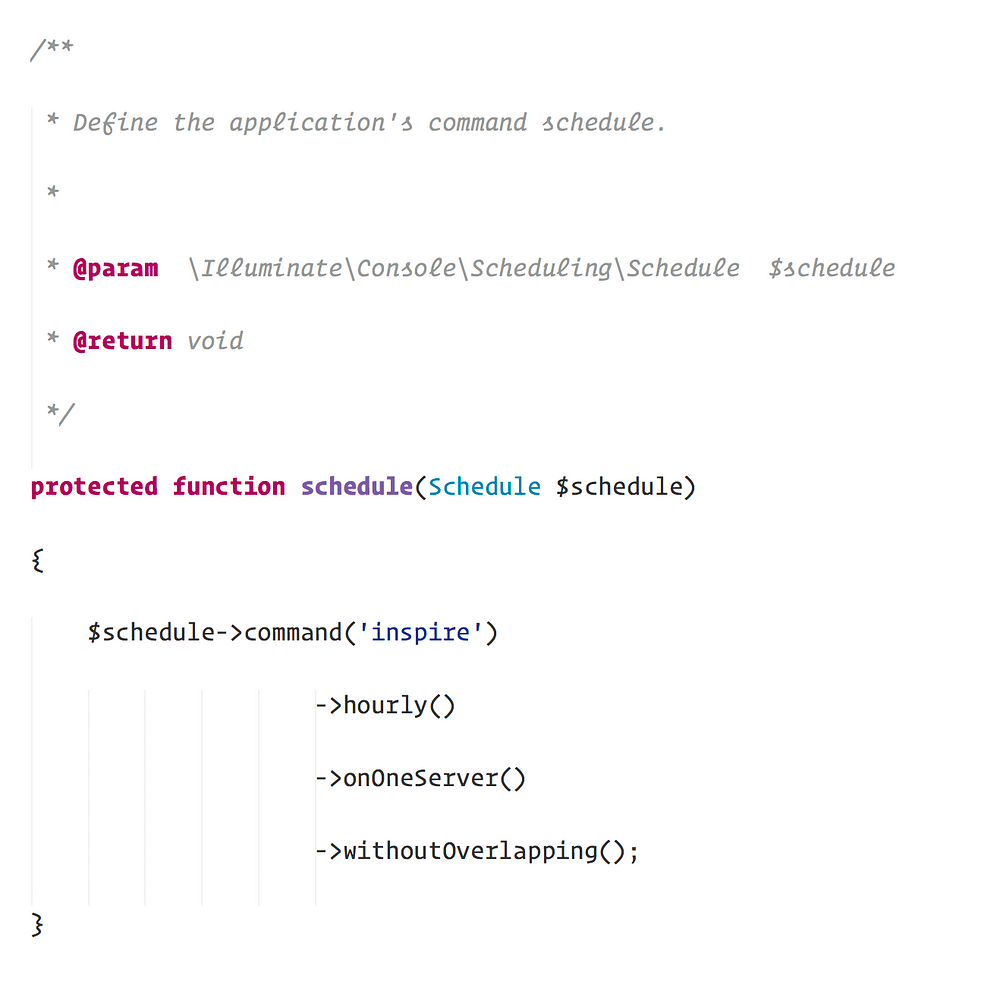
To demonstrate the new feature, let’s look at an example scheduled job definition:

In this example, the inspire Artisan command will run every hour; however, the command will not run if the previous iteration of the command has not finished executing within the hour (that’s a lot of inspiration!).
However, one caveat to this approach is that the scheduled job will execute on every server your application is running on. So, for example, if you have this application deployed to two web servers and two worker servers the command will run on all four servers. Sometimes, especially when generating reports or cleaning up data, you only need the command to run on a single server. Thanks to Laurence’s contribution to Laravel 5.6, it’s now a cinch:

As you can see, all we need to do is add the directiveonOneServer to our scheduled job definition. Now the job will run hourly on one of our servers!
Note: When using this feature, you will need to use the Redis or Memcached cache drivers. These drivers provide the atomicity needed to secure the locks that power this feature.
I’m really happy to see this contribution because this is a pain point I have experienced myself and I *love* getting rid of those little pain points. Thanks, Laurence!
Laravel 5.6 is scheduled for release in February 2018.

Original Text from 

Monday, November 27, 2017

November 27, 2017

Laravel 5.5 with Boostrap 4.0.0-beta.2 (100% work)


To use Bootstrap 4, which is in beta at the moment of writing, you will need to take the following steps:
  1. run npm install bootstrap@4.0.0-beta.2 --save-dev to install/overwrite the latest version
  2. change require('bootstrap-sass') to require('bootstrap') in your bootstrap.js file
  3. change @import "~bootstrapsass/assets/stylesheets/bootstrap"; to
    @import"~bootstrap/scss/bootstrap"; in your app.scss file. Also make sure to remove the reference to variables since these will not work with BS4
  4. run npm run dev in the command line to generate the .css and .js file
Please be aware that the scaffolded auth templates will break due to new class names in BS4.